Table of Contents
Points Miles and Bling (blog) contains referral or affiliate links. The blog receives a small commission at no additional cost to you. Thank you for your continued support. Credit Card issuers are not responsible for maintaining or monitoring the accuracy of information on this website. For full details, current product information, and Terms and Conditions, click the link included.
After purchasing an economy or premium economy fare, Air Canada offers a multitude of ways to fly in business class, ranging from eUpgrades to Bid Upgrades to Last-Minute Upgrades (LMUs). What’s the difference between them, and which has the greatest chance of success? Does your status matter? To be honest, it’s all a little complicated and a bit of a black box, which I suspect airlines do on purpose to make it harder to figure out how your upgrade will turn out; after all, they prefer to sell a full-fare business class ticket.
Air Canada also offers Bid Upgrades using Aeroplan points, but we won’t discuss that in this article as the usual value offered is 1 cent per point (CPP). I value Aeroplan points at much higher than that, and I encourage you to do the same. With points, it’s best to book directly into business class, and it’s not as hopeless as you think, as Air Canada frequently opens business class in the saver fare close to the date of departure.
eUpgrades
Anshul’s written about eUpgrades on the blog before, so I won’t rehash all the details. To highlight, eUpgrades lets you confirm an upgrade to a higher cabin. Air Canada awards them when you reach certain SQC thresholds, either automatically or as a benefit you select. Aeroplan Elite members are able to share their credits with up to four other people, and when you clear depends on your fare class and Elite status.
For example, an Aeroplan 50K member on an Economy Flex ticket travelling to Sun destinations will clear at the earliest 10 days before departure. While this is the earliest possible time, eUpgrades can clear right up until the time of departure. FlyerTalk even coined the expression “you board, you lose” (YBYL), because Air Canada removes you from the eUpgrade waitlist as soon as the gate agent scans your boarding pass. That said, someone recently reported receiving a new boarding pass after boarding, suggesting onboard upgrades may still occur. I certainly hope that’s true.
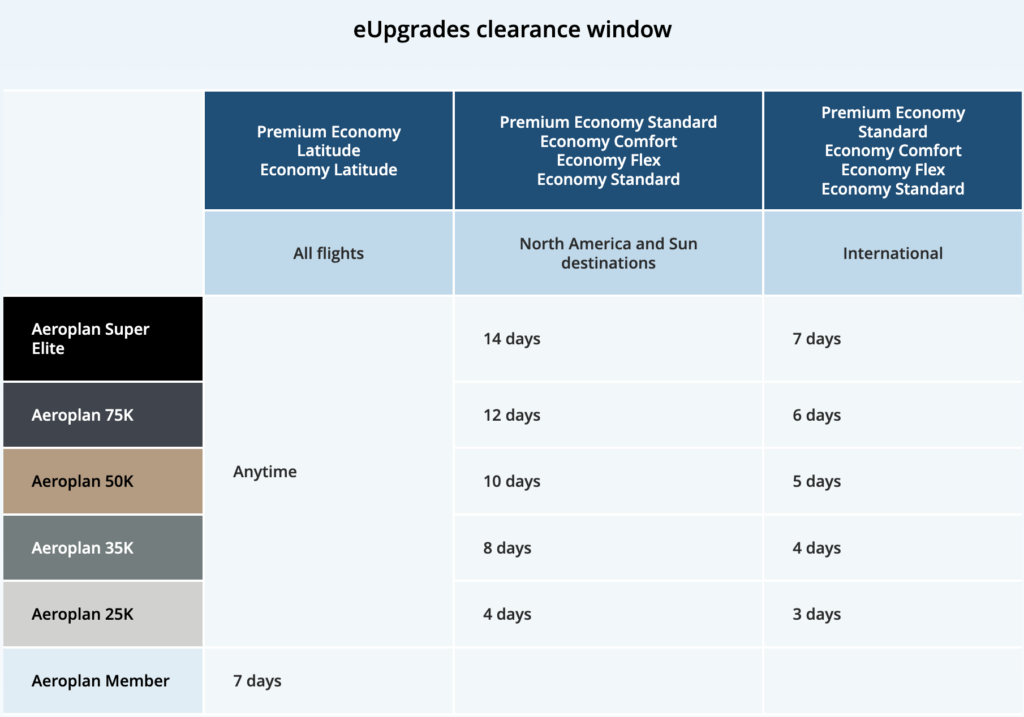
Air Canada eUpgrade clearance window
Your fare class determines how many eUpgrades you need, while Air Canada waives all cash co-pays for Super Elite members.
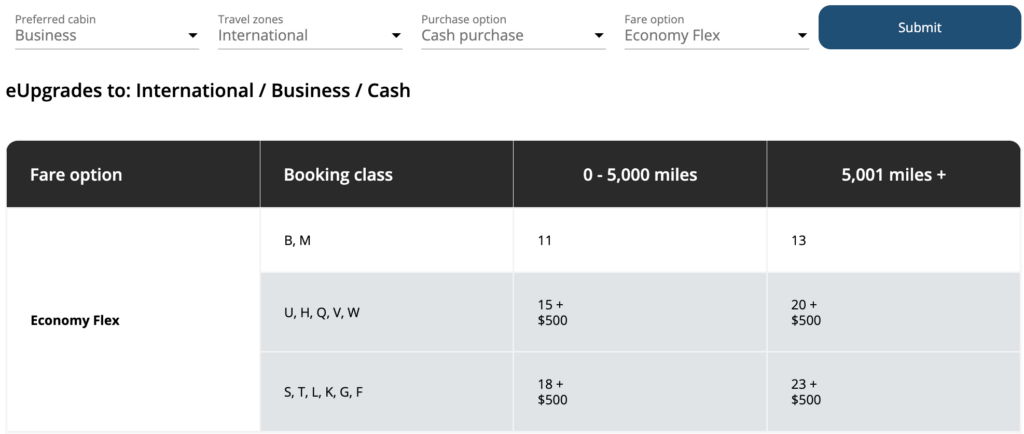
How many eUpgrades do you need?
The best-case scenario for upgrading with eUpgrades is to book an Economy Latitude or Premium Economy Latitude fare when eUpgrade space (“R” space, check on ExpertFlyer) is available on the flight. In this scenario, you can confirm an upgrade immediately upon booking. Of course, the downside is that the price of a Latitude fare often approaches the cost of purchasing business class outright.
Unlike Bid Upgrades and Last-Minute Upgrades, any co-pays paid count towards earning Status Qualifying Credits (SQC), at a rate of 2 SQC per $1 spent.
Bid Upgrades
All passengers, except those booked in Basic Economy class, are eligible to submit a Bid Upgrade, regardless of status. Having higher status does not lower the minimum bid in any way. The Bid Upgrade option will appear in the “manage booking” flow, or you can request it directly on the AC Bid Upgrade page. You can submit a bid up to 48 hours before departure, when Air Canada will also notify you whether your bid was successful. Your credit card is only charged at this point if your bid clears.
If your booking has multiple passengers and only some wish to submit a Bid Upgrade, you must first contact Air Canada to split the PNR. Should your bid be successful, your upgrade to Signature Class only applies to the actual in-flight experience, meaning all fare conditions of your original ticket apply, including the accrual of frequent flyer points.
There’s a graphic Air Canada shows to indicate the strength of your bid, aka how likely you are to clear. Air Canada will occasionally run a “sale”, lowering the minimum spend on select routes; however, I’m not sure how this works in practice because the minimum bid is always low on the “offer strength” scale, so is there a point in submitting an even lower bid if the existing number is already unlikely to clear?
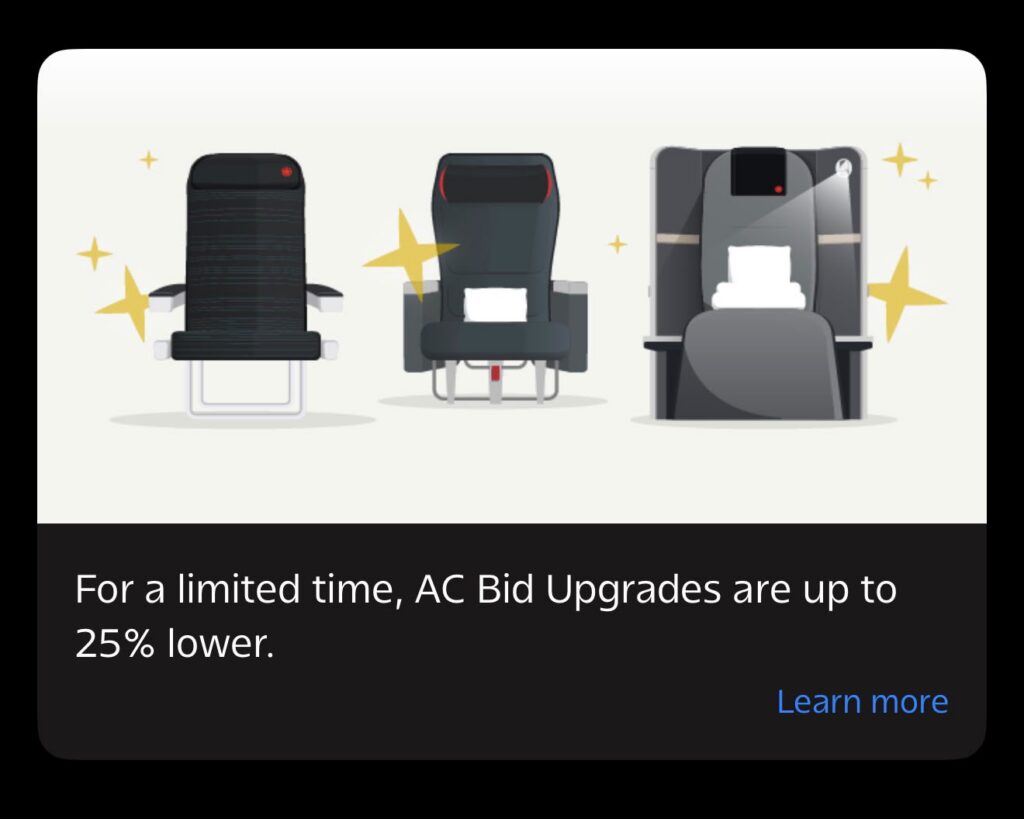
Air Canada bid upgrade on “sale”
Sometimes, Air Canada offers an instant upgrade option along with a Bid Upgrade, which is a fixed amount you can pay to immediately confirm a seat in premium economy or business class.
Strategy
My gut recommendation is to bid just above the minimum so you’re at least higher than many people who will submit the lowest bid, but I’ve also never attempted a Bid Upgrade, so I can’t say for certain. You can also submit Bid Upgrades for tickets booked with Aeroplan points.
Note: upgrades to Signature Class using Bid Upgrades are not eligible for entry to the Signature Suite, as only tickets booked into business class using cash or Business Latitude (Aeroplan points) qualify.
Last-Minute Upgrade (LMU)
A Last-Minute Upgrade (LMU) works similarly to a Bid Upgrade, except you secure the upgrade immediately by paying the displayed price. Air Canada doesn’t always offer LMUs. When it does, you may see them alongside Bid Upgrades or only at check-in after the bid upgrade window closes 48 hours before departure.
As with bid upgrades, the upgrade makes your in-flight experience much more pleasant, but your cancellation policy and points accrual remain as they were on your original ticket. You can even combine both to upgrade twice, for example, upgrading to premium economy with a Bid Upgrade and then upgrading to business class at the time of check-in.
Comparing Your Options
If you submit both an eUpgrade request and either a Bid Upgrade or a Last-Minute Upgrade, Air Canada requires you to cancel the eUpgrade request if the paid upgrade clears. Bid Upgrades are non-refundable once confirmed (even if you want to cancel your ticket).
As for which has higher priority for upgrades, so to speak, Air Canada says “decisions on whether to accept AC Bid Upgrade offers are made 48 hours prior to departure, ensuring that Aeroplan Elite Status Members continue to have preferred access to more upgrade seats when requesting an upgrade using eUpgrade credits”, which suggests Elite members with eUpgrades are prioritized. Aside from that, Air Canada does not make it terribly clear for obvious reasons.
I’m inclined to believe eUpgrades do take precedence because even 25K members clear at least 3 days before departure, which is before Bid Upgrades are processed.
It’s unclear whether Elite members are prioritized over non-Elite passengers for Bid Upgrades, though I would expect that to be the case.

Takeaway
Air Canada offers several ways to move from economy or premium economy into business class, and each has its place. If you have Aeroplan Elite Status, eUpgrades remain the gold standard because they can be confirmed in advance, cost only eUpgrade credits, can clear up until the moment of departure, and co-pays count towards SQC-earning. For everyone else, Bid Upgrades and Last-Minute Upgrades offer a chance to enjoy Signature Class without paying the full business-class fare.
Ultimately, the best strategy depends on your flexibility, Elite status, and willingness to pay. Air Canada intentionally keeps much of its upgrade process opaque, so there’s no guaranteed winning formula. Still, understanding how each option works and when it makes sense to use it will give you the best chance of ending up in the pointy end of the plane.
Featured Image Credit: Air Canada
