
Table of Contents
Points Miles and Bling (blog) contains referral or affiliate links. The blog receives a small commission at no additional cost to you. Thank you for your continued support. Credit Card issuers are not responsible for maintaining or monitoring the accuracy of information on this website. For full details, current product information, and Terms and Conditions, click the link included.
October 2026 Update: Link seats.aero to ChatGPT, Claude, or Gemini and Search
You can now link seats.aero to your preferred AI assistant, including ChatGPT, Claude, or Gemini. Head to the Seats.aero AI assistant landing page for instructions.
This gives your AI assistant the ability to search and set alerts. Searching is the big one because you can make requests using natural language. Honestly, the results are pretty impressive.
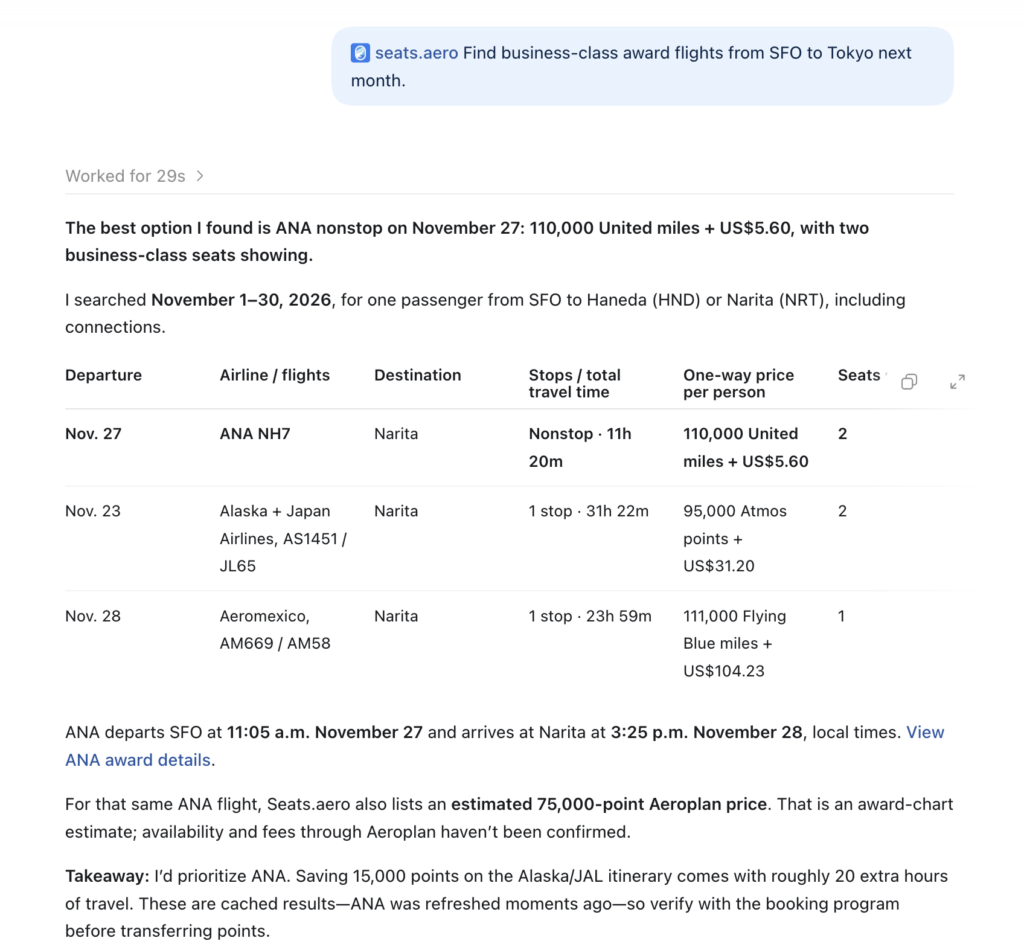
Connect Seats.aero to your AI assistant
However, I wouldn’t expect AI to automatically suggest the next best steps if the initial search finds no good routings. For example, the ANA NH7 results above are actually phantom, and after telling ChatGPT so, it defaults to offering the next options available (at dynamic pricing), and does not suggest searching from alternative airports to find saver space.
Once you direct it to search all of U.S., for example, of course it is able to execute.
Set Alerts Directly with AI Assistant Integration
My favourite use of the AI Assistant integration is to set award space alerts. With a simple request, ChatGPT with the seats.aero integration was able to set the exact alert I wanted on the date.
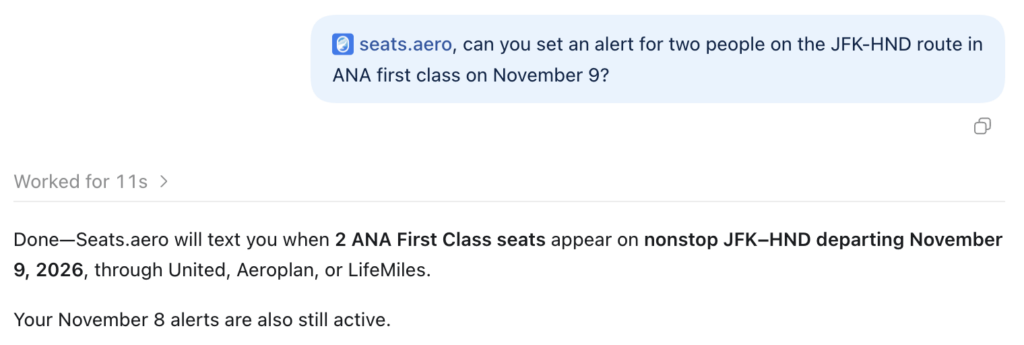
Ask ChatGPT to set alerts on Seats.aero
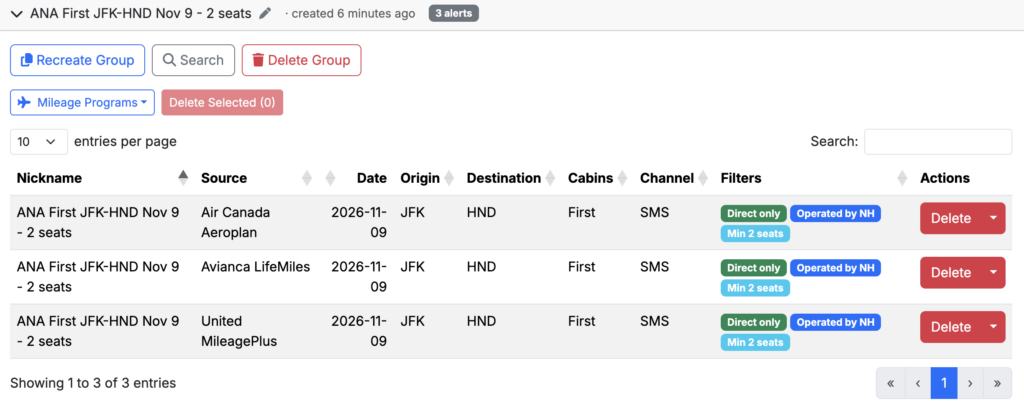
Your AI assistant can set seats.aero alerts
It even set the operating airline filter and defaulted to SMS with my usual phone number. For my ANA First Class request, it chose Aeroplan, United, and Lifemiles as the tracked programs — which is correct because Virgin Atlantic can’t search ANA online and ANA Mileage Club is not a supported program on seats. aero.
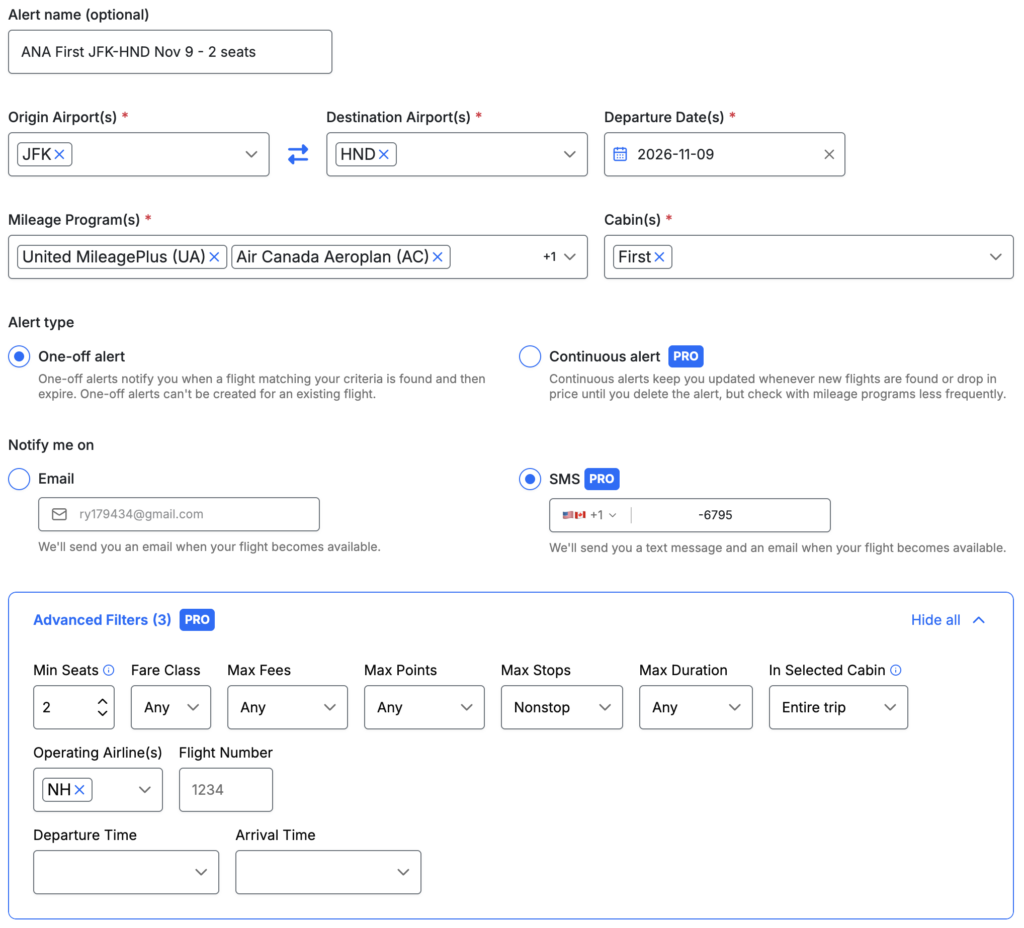
ChatGPT selected the correct award programs
What is Seats.aero
Seats.aero is a powerful award flight search service that lets you search entire regions at once, set alerts for award space, and view dedicated search results for specific redemptions. It’s for the points nerds who already know what they’re doing and just need to look for space. Seats.aero does not walk you through transferring points or making the redemption.

Search entire regions at once
Seats.aero supports 20+ frequent flyer programs. It’s very comprehensive, since award space usually matches across partner airlines. British Airways Avios is not a supported program, but you can choose American AAdvantage or Qatar Airways Privilege Club instead.
Set Award Space Alerts
The best feature of Seats.aero is its ability to set alerts for when award space opens. You can set alerts for both email and SMS, with SMS being best for rare award space where booking speed is essential.
A cool feature when setting alerts is the ability to pick not just frequent flyer programs, but also points currencies you hold. For example, if you have Amex MR Canada, you can select “Amex Canada” without having to pick Aeroplan and Flying Blue separately.

Select “Alliance” or “Transferable Points”
The “Advanced Filters” are a must, allowing you to select a minimum number of seats, a maximum points price, and a maximum number of stops. There are even more filters, but the above are the ones I use most.

You can even set alerts for specific flights using the flight number
If you have the mobile app, alerts will also come in as an in-app notification. Email notifications are always on, and then SMS if you select that option.
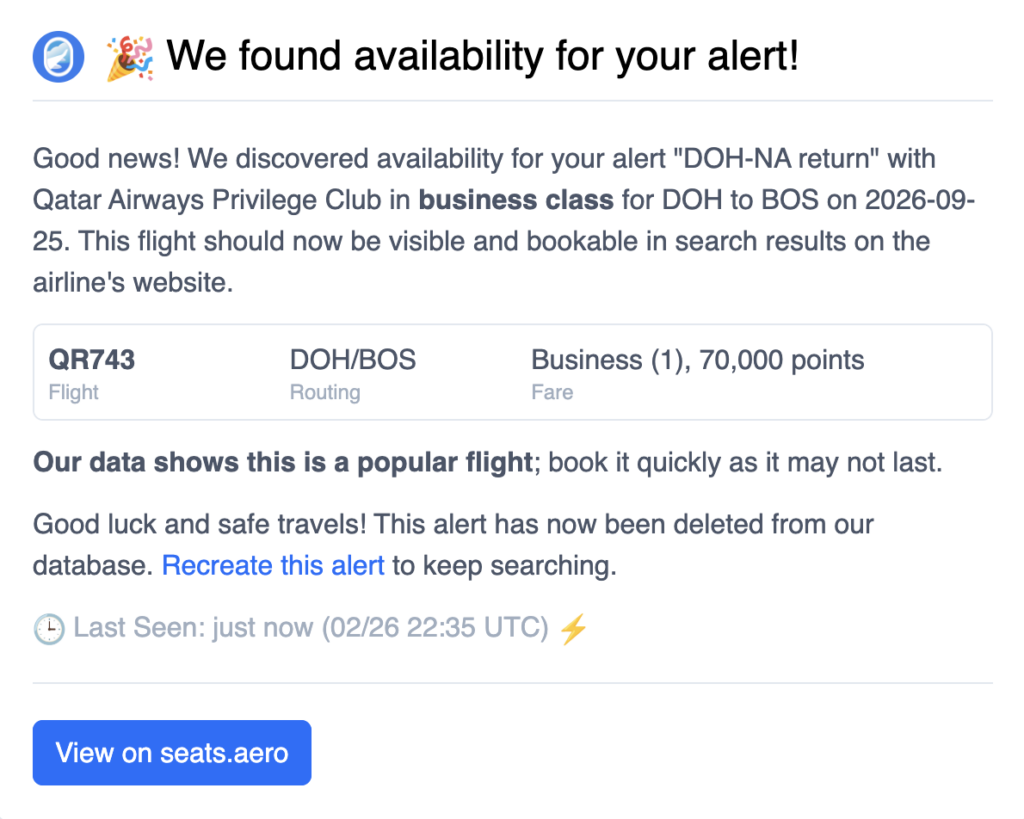
Qatar Qsuites, anyone?
Google Flights Integration, Redesigned Search and Cardholder Pricing
seats.aero has rolled out a new Chrome extension that integrates award pricing directly into Google Flights, alongside a redesigned search interface and expanded support for airline-specific cardholder award pricing.
Our affiliate link for Seats.aero Pro
Award pricing now appears directly inside Google Flights
The headline update is the new Chrome extension for Google Flights. Rather than searching for cash fares in Google Flights and then opening a separate award search tool to compare redemption options, eligible users can now see both cash and award pricing in a single interface.
When browsing flights in Google Flights, the extension displays award pricing directly beneath the cash fare, allowing travellers to quickly determine whether redeeming points represents good value for a particular itinerary.
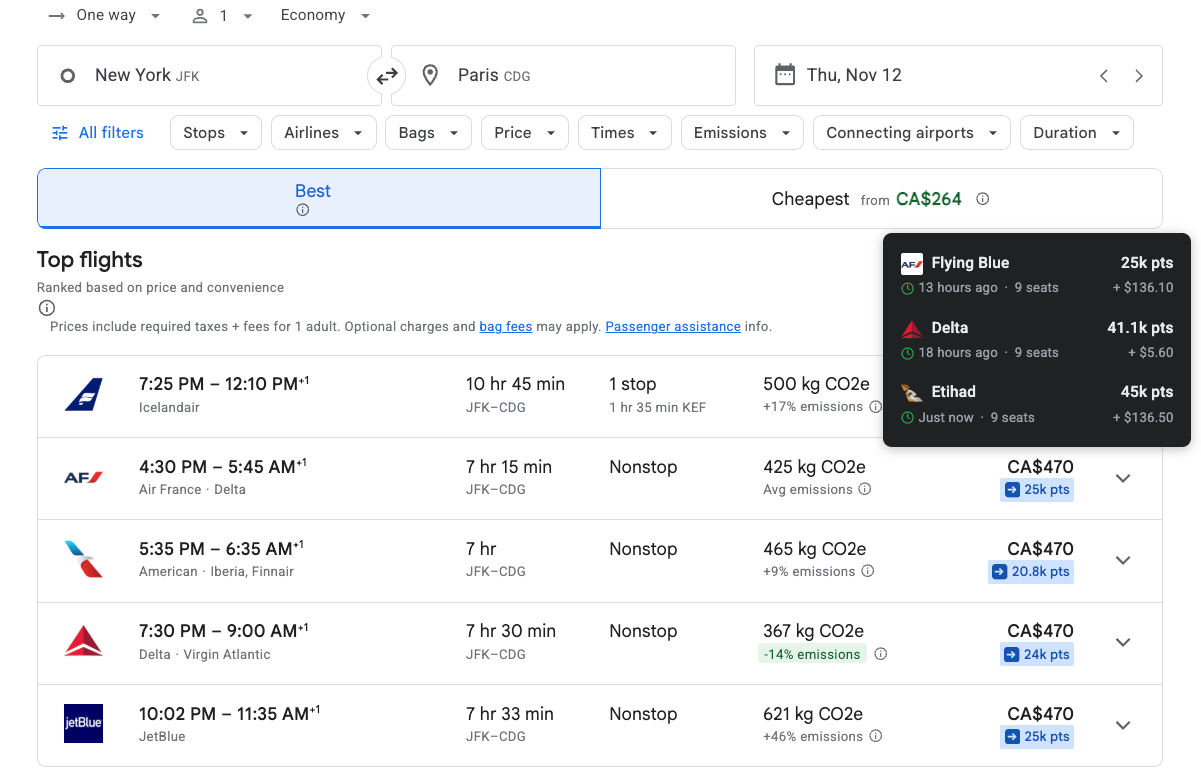
For each flight, the extension can display:
- The number of points required for the redemption
- The approximate value received per point compared to the cash fare
- Alternative loyalty programs that can be used to book the same flight
The extension also works with other online booking platforms, including Chase Travel, with additional travel booking sites expected to be added over time.
The level of data available depends on your seats.aero membership. Pro members receive live award pricing, while free members can view cached award availability for flights departing within the next 60 days.
For travellers who routinely begin trip planning in Google Flights before deciding whether to redeem points or pay cash, this removes one of the friction points in the award booking process.
Redesigned search interface adds more ways to compare award options
Alongside the browser extension, seats.aero is also introducing a redesigned search experience with additional sorting, filtering and comparison tools. Among the new additions are sorting options that make it easier to identify the cheapest award by date or the least expensive nonstop itinerary. Search filters have also become significantly more granular, allowing users to narrow results by:
- Connection airport
- Aircraft type
- Departure and arrival times
- Fare code
- Total flight duration
Flight results now include more supporting information, such as previews of transfer partners, historical award pricing charts, and one-click price drop alerts when award costs decrease. Users can also further personalize search results by hiding specific cabin classes, prioritizing preferred airports and choosing whether results display airport codes or city names.
The redesigned interface is being released in phases, with a broader rollout expected by early August.
United and Delta cardholder pricing now supported
Another enhancement is expanded support for airline cardholder award pricing. Pro members can now enable cardholder pricing for both United MileagePlus and Delta SkyMiles directly within their seats.aero profile settings. Once enabled, searches will reflect the discounted award pricing available to eligible airline credit card holders instead of standard public pricing.
For United MileagePlus members, this extends beyond lower pricing alone. Eligible cardholders can also access expanded award inventory, allowing seats.aero to surface flights that are only available to United cardholders.
Our affiliate link for Seats.aero Pro
The “Explore” Function
If you ever see me sitting around doing nothing, I’m clicking around the “Explore” tab on Seats.aero. It makes it easy to stay on the ball when it comes to general availability patterns.
You can select an award program and it will show a list of currently available award space. At the top of the list, select your search regions. Then there are endless filters and customizations, with green prices indicating direct flights and blue prices indicating flights with connections.
I like to click the arrows next to “Business” to surface flights with business class availability first. I also enter specific dates in the bottom-left tab when needed. The bottom tabs are very handy as you can also enter the exact airport you’re searching for.

“Explore” shows lots of results, then filter as desired
In practice, I use the “Explore” tab more than “Search.” The Explore tab shows results across an entire program first, and then I can refine the filters as needed. The Search tab, by contrast, applies narrow filters right from the start. Of course, the ideal situation is that “Search” works by finding exactly what you want. However, given how scarce award space can be, I’m more likely to find something useful by searching all of Asia rather than just Tokyo.
“Explore” is the best way to book award flights at saver prices if you are flexible on product, destination, or both.
Product-Specific Award Tool
Seats.aero has very handy award tools for aspirational flights like ANA First Class and Qatar Qsuites.

Aspirational, but also practical like Air Canada eUpgrade Finder (temporarily down)
Clicking one of these shows all available flights featuring that product.

JAL First Class Finder
Other Seats.aero Features
The above are what I consider the major reasons to pay for Seats.aero, while there are a few other “nice to haves”. Seats.aero also has a Routes tool where you can track a specific route across all dates within a frequent flyer program.
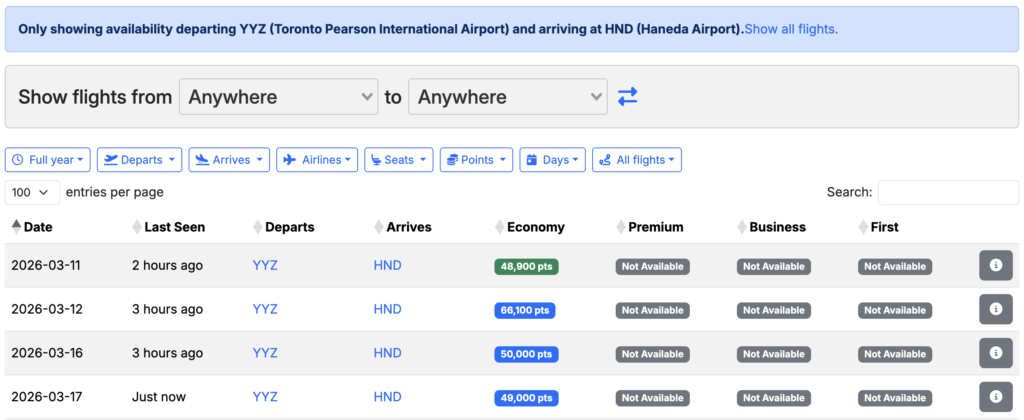
“Routes” tool
Seats.aero also has a hotel award space tracker called Rooms.aero, working similarly to flights. Just this week, I got alerts for standard room award space at Courtyard Ginza, which means I won’t need to stay at the Moxy Kinshicho (both are bookable with 35,000-point Marriott Free Night Awards).

Rooms.aero alert
Seats.aero is Not Perfect
But then again, what is? Like Thrifty Traveler, Seats.aero does miss things. It’s not searching every route continuously, so some award space will inevitably be cached and no longer available when you try to book it (Seats.aero does say when it was last seen).
The other issue is that alerts aren’t searching constantly so it’s possible that award space opened up and was booked between Seats.aero searches, and you never receive a text at all. That’s why at PMB, we stress the importance of tracking award space release patterns for yourself to increase your odds, in addition to using alert tools like seats.aero.
Takeaway
Seats.aero is one of the most powerful tools available for finding award space, and it’s a service I’ve happily paid for over the years. The ability to search entire regions at once, monitor availability across multiple frequent flyer programs, and set alerts when space opens makes it far easier to book hard-to-find redemptions.
It’s truly one of those tools where once you have it, you wonder how you lived without it.
Our affiliate link to Seats.aero Pro


1 comment
Great work. I am always impressed by the hard you do to present these information to us. Big huge THANK YOU.